What Is Storm POS? A Complete Tour of Every Feature (with Real Screenshots)
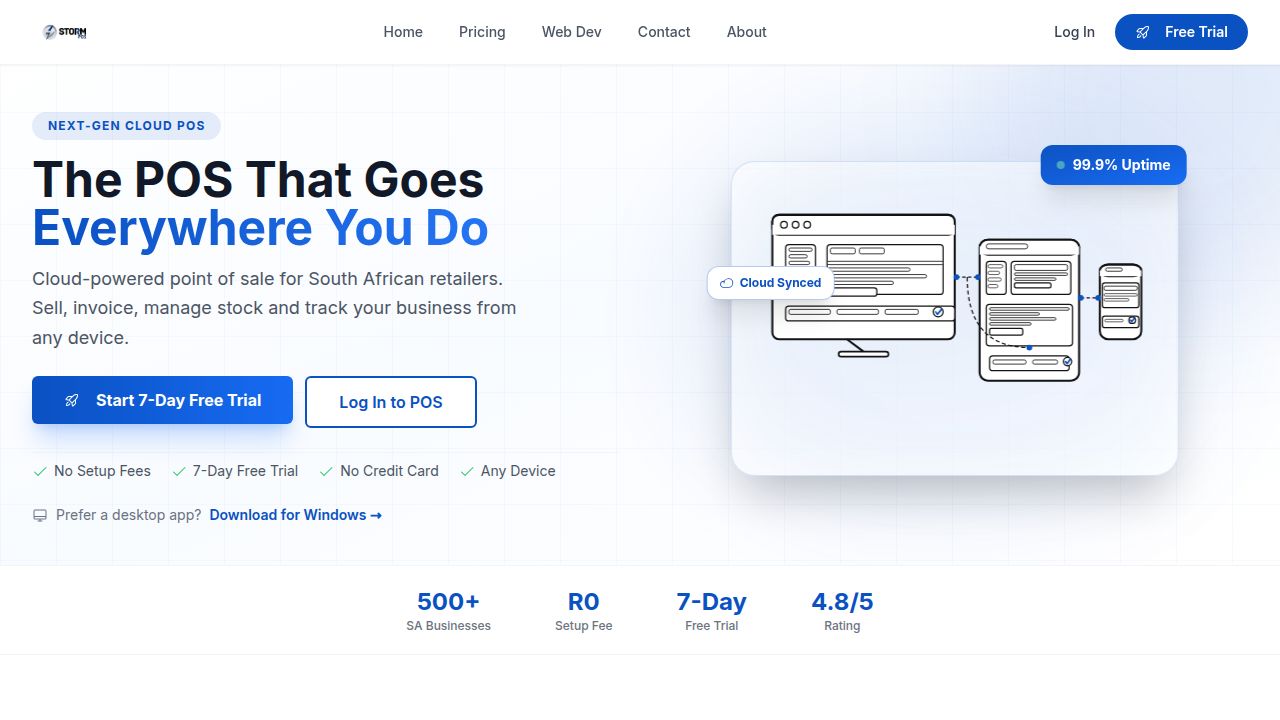
If you've ever stood behind a counter trying to keep stock right, ring up a sale, send a customer their invoice, and figure out what actually sold last week — all on different bits of paper and three different apps — you already understand the problem Storm POS was built to solve.
Storm POS is a cloud-powered point of sale designed in South Africa, for South African retailers, cafes, bars, salons, hardware shops, takeaways and small wholesalers. It runs in your browser, on a tablet, or as a native Windows desktop app, and it works whether your internet is up, your power is out, or you're switching between English and Afrikaans mid-shift.
This is a proper walk-through. No vague marketing — just the real screens, what each one does, and why each part exists. Every screenshot below is from the actual live system.
The Big Idea: One Screen, Your Whole Business
Storm POS lives at one URL. Sign in on a laptop in your office, on a tablet at the till, and on your phone while you're at the supplier — you'll see the same products, the same stock counts, the same customers, the same sales. Cloud sync isn't a marketing word here; it's how the whole thing is built. Make a sale on the tablet, your phone shows the new stock level a second later.
You don't need to install anything to start. Open the browser, log in, sell. Want a desktop app for the front-of-house terminal? There's a Windows download too — same software, same data, just packaged as a proper app for shops that prefer that.
What makes it different
No setup fees. No card-swipe percentage cuts. Flat-rate monthly pricing in Rand. Built specifically for South African trading conditions — load shedding, intermittent connectivity, bilingual staff, VAT-ready invoices.
1. The Sales Screen — Where You Actually Make Money
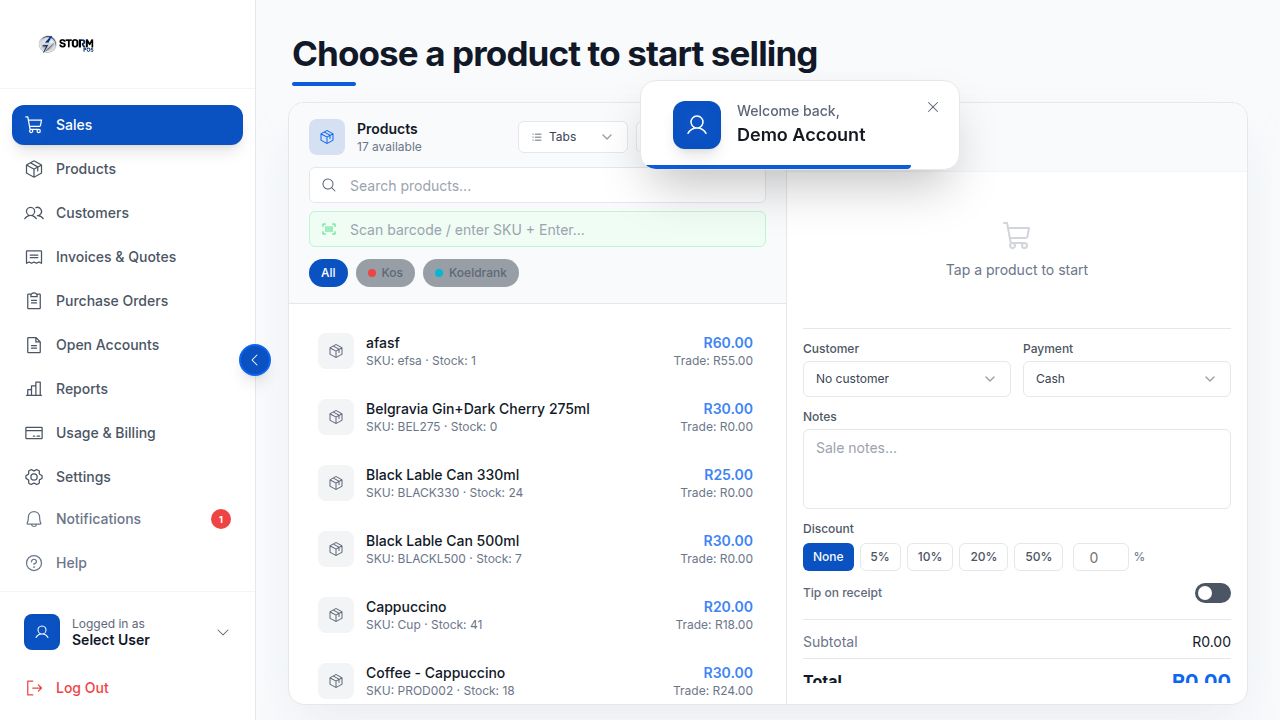
This is the screen your staff will live on. Three columns, all visible at once, no clicking through screens to ring up a sale:
- Left: Your full product catalogue. Search by name, scan a barcode, or filter by category (you can see "All / Kos / Koeldrank" tabs above the product list — those are your own categories, you create them).
- Middle: The cart. Tap a product, it lands here. Adjust quantities with + / -, remove with the trash icon, watch the subtotal update live.
- Right: Sale settings — pick the customer (or leave it as "No customer" for a walk-in), pick the payment method (Cash, Card, or EFT), add sale notes, apply a discount (None / 5% / 10% / 20% / 50% / custom), turn on tip lines, then complete the sale.
The barcode field at the top accepts a real USB scanner — plug it in, scan an item, it drops into the cart instantly. No keyboard, no fiddling.
Discounts that actually make sense
You'll notice the discount row gives you preset tiers (5/10/20/50%) plus a free-form % field. That's because in real shops you discount the same amounts over and over (10% off for a regular, 20% for staff). One tap, done. Need something custom? Type it. The discount applies to the whole sale and shows up on the receipt.
Tips, notes, and customer-specific pricing
Flip the "Tip on receipt" switch and the printed slip leaves space for the customer to write a tip — perfect for restaurants and salons. Sale notes are for you (e.g. "delivered Tuesday", "wants pickup at 4pm"); they're attached to the sale forever and show up in your sales history. And if you select a customer who has trade pricing, the cart automatically uses their trade prices, not the retail prices.
2. Products & Inventory — Stock That Tracks Itself
The Products tab is your full inventory. Every item has a name, SKU, cost price, retail price, optional trade price, current stock count, category, and an optional image. You can edit any field inline, see low-stock and out-of-stock badges right on the row, and search across hundreds of products without it slowing down.
What happens behind the scenes is the bit that matters: every sale automatically deducts stock. Sell three Black Lable Cans, your stock count drops by three. No second app, no separate spreadsheet, no end-of-day stocktake reconciliation. The number you see on the product list is the number on the shelf (assuming nobody walked off with one).
Need to add 50 new products in bulk? There's a CSV import. Need to take stock to a market and bring back the leftovers? There's a stock adjustment screen. Need to push out a price change across a whole category? You can do that in seconds.
Categories you actually use
Categories aren't a fixed list — you create them. A coffee shop might have "Hot Drinks / Cold Drinks / Food / Retail". A bottle store might have "Beer / Wine / Spirits / Mixers / Cigarettes". They show as filter chips on the sales screen so staff can find an item in one tap.
3. Customers — Build a Database, Not Just a Receipt
The Customers tab is a proper CRM, lite version. Every customer has a name, phone, email, and full purchase history. When you select them on a sale, their info attaches to the receipt and the invoice. Over time you build a database of who actually shops with you, what they buy, and when they last came in.
That data isn't decoration. It powers two things you'll use weekly:
- Open accounts (account/tab customers): regulars who pay later. Add items to their tab through the day, settle when they pay. Storm POS keeps a running balance so nobody gets confused.
- Customer-specific pricing: trade customers automatically get trade prices, walk-ins get retail. No one has to remember.
4. Invoices & Quotes — Send a Pro-Looking PDF in 30 Seconds
This is where Storm POS pulls way ahead of a basic till. Open the Invoices & Quotes tab, click New Invoice, pick a customer (their details auto-fill), add line items from your products (descriptions, prices and VAT calculations all pre-fill), and Storm generates a professional PDF on the spot.
The PDF includes your company logo, your business address, your VAT number, the customer's details, the line items with their VAT calculations, the total in Rand, and your banking details for EFT. You can email it directly from inside the app, download it, or print it.
Quotes work exactly the same way — and when the customer says yes, you convert the quote into an invoice in one click. No retyping. The same flow handles credit notes, deposit invoices, and recurring invoices for monthly clients.
5. Purchase Orders — Re-Stock Without the Spreadsheet
Running low on stock? Open Purchase Orders, pick a supplier, add the products you need (with the quantities and your usual cost prices pre-filled), and Storm generates a PO PDF you can email to your supplier. When the stock arrives, mark it received and your inventory counts automatically go up.
That's the loop most small shops do badly with bits of paper and WhatsApp messages. Storm POS makes it boring, which is what you want for stock management.
6. Reports — See What's Actually Happening
The Reports tab gives you the views every owner asks for and most POS systems hide three menus deep:
- Sales by day / week / month — see your revenue trend at a glance
- Top products — what's selling, what's sitting
- Top customers — who keeps the lights on
- Payment breakdown — how much came in via Cash vs Card vs EFT
- Staff performance — who rang up the most sales (when you have multiple staff accounts)
- VAT report — the number you actually need at month-end for SARS
Every report exports to PDF or Excel for your accountant. The VAT report alone saves most owners a Sunday afternoon every month.
7. Bilingual: Full Afrikaans Support, Not Google Translate
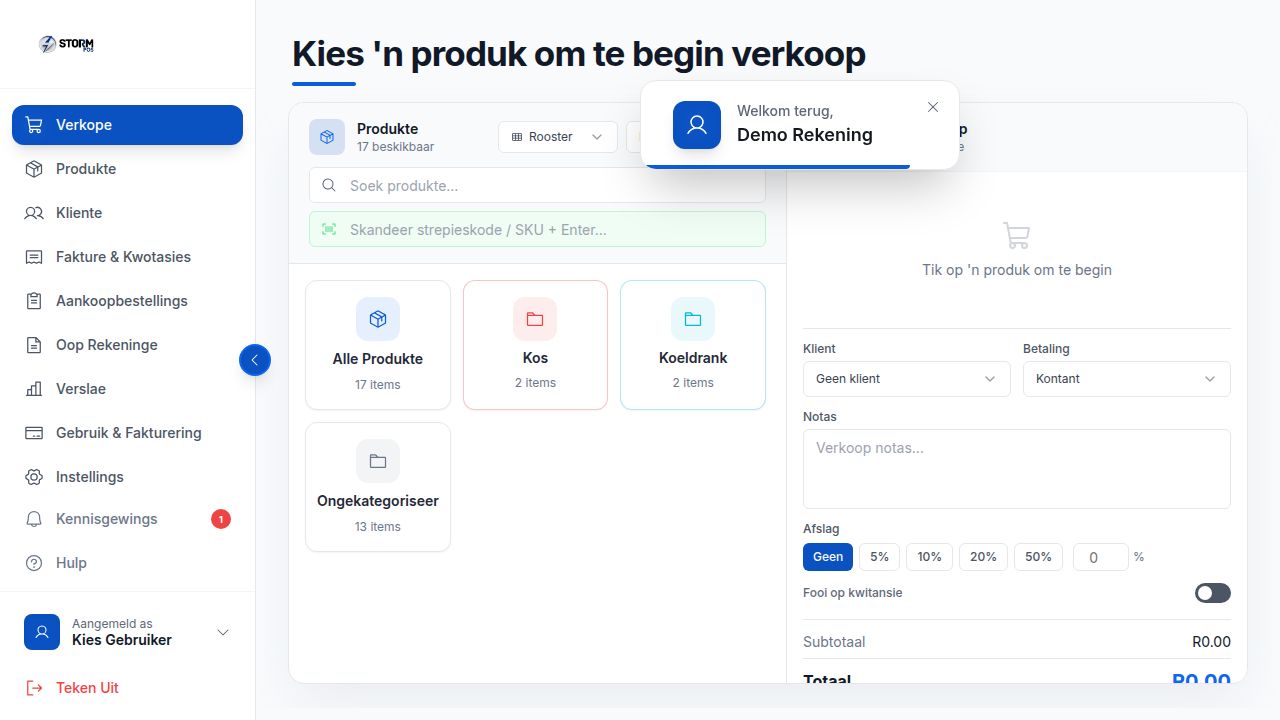
Storm POS is the only cloud POS with a proper, hand-translated Afrikaans mode. Every menu, every button, every label, every receipt, every invoice, every error message — translated by humans who actually speak the language. Switch any time from the sidebar.
That matters in practice. Plaaslike personeel kan in Afrikaans werk; jou klante kry kwitansies en fakture in die taal wat hulle verstaan; en jou hele backend admin werk in dieselfde taal. Geen verwarring, geen sleg-vertaalde knoppies nie.
For a Karoo farm shop, a Wes-Kaap bakery, or a Bloemfontein hardware store, this isn't a nice-to-have. It's the difference between staff using the system properly and staff working around it.
8. Staff Accounts & Permissions
Every staff member gets their own login. The owner can see everything; cashiers can only ring up sales; supervisors can do refunds and discounts. Every action is logged against the staff member who did it, so when you see a 50% discount on yesterday's sales you know exactly who to ask.
On the Growth and Scale plans you get up to 5 staff accounts and unlimited respectively, with proper role-based permissions — not just "everyone shares one login".
9. Built-In Help Centre — Your Staff Train Themselves
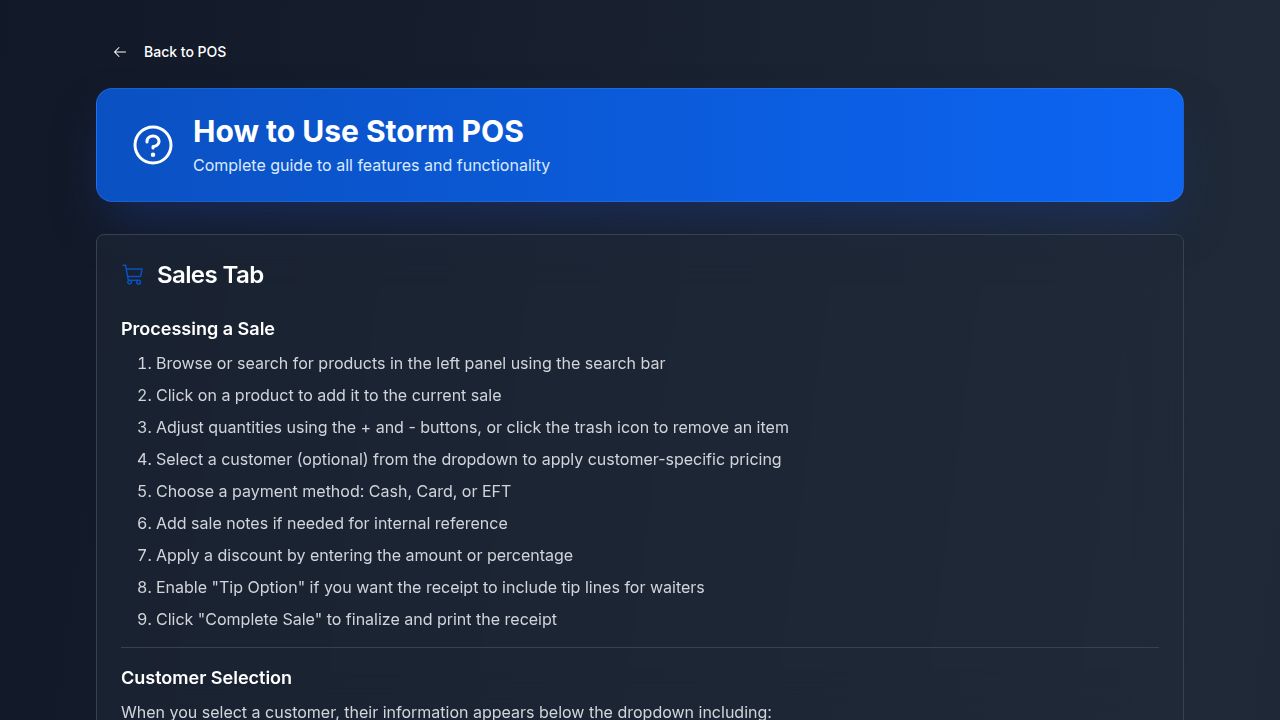
New staff member starting Monday? Point them at the in-app Help icon. There's a complete walkthrough for every tab — Sales, Products, Customers, Invoices, Reports, Settings — written in plain English (and Afrikaans). They'll be productive in a morning instead of a week.
That's an under-rated feature. Most POS systems make you read a 200-page PDF or watch YouTube videos. Storm puts the answer right next to the button.
10. Secure, Cloud-Synced Login
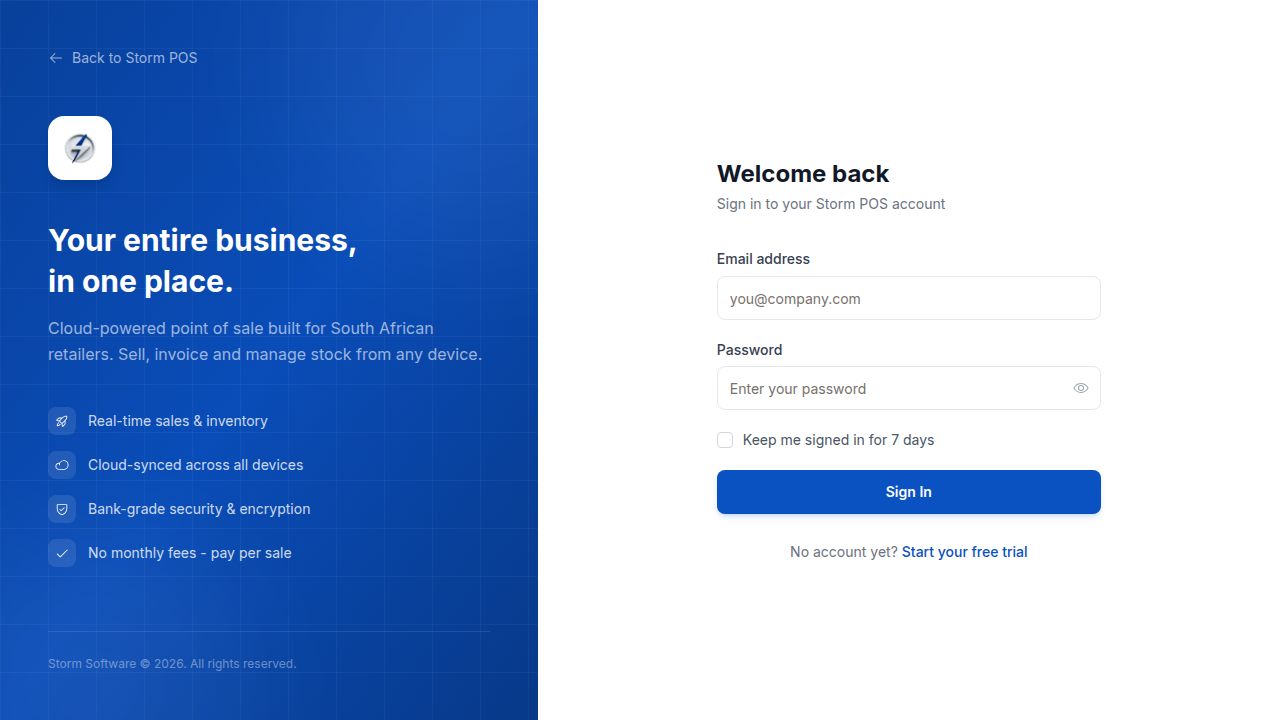
Bank-grade encryption. Your data lives in the cloud, not on a hard drive that can crash and take six months of sales with it. If your tablet falls in the sink, you log into the new one and everything's there. If you switch from a laptop to a tablet at lunchtime, your day-in-progress is waiting for you.
The "Keep me signed in for 7 days" option is genuinely useful — staff don't have to retype passwords every morning, but the session still expires sensibly.
11. Load Shedding & Offline Mode
The South African killer feature. When the lights go out (or the internet drops), Storm POS keeps trading. Sales process locally on the device, get saved offline, and automatically sync to the cloud the moment connectivity returns. Customers don't notice. You don't lose a single transaction.
On the Windows desktop app this is even more solid — sales just keep happening through the outage. Your reports will show the synced sales as if nothing happened.
12. Honest, Flat-Rate Pricing
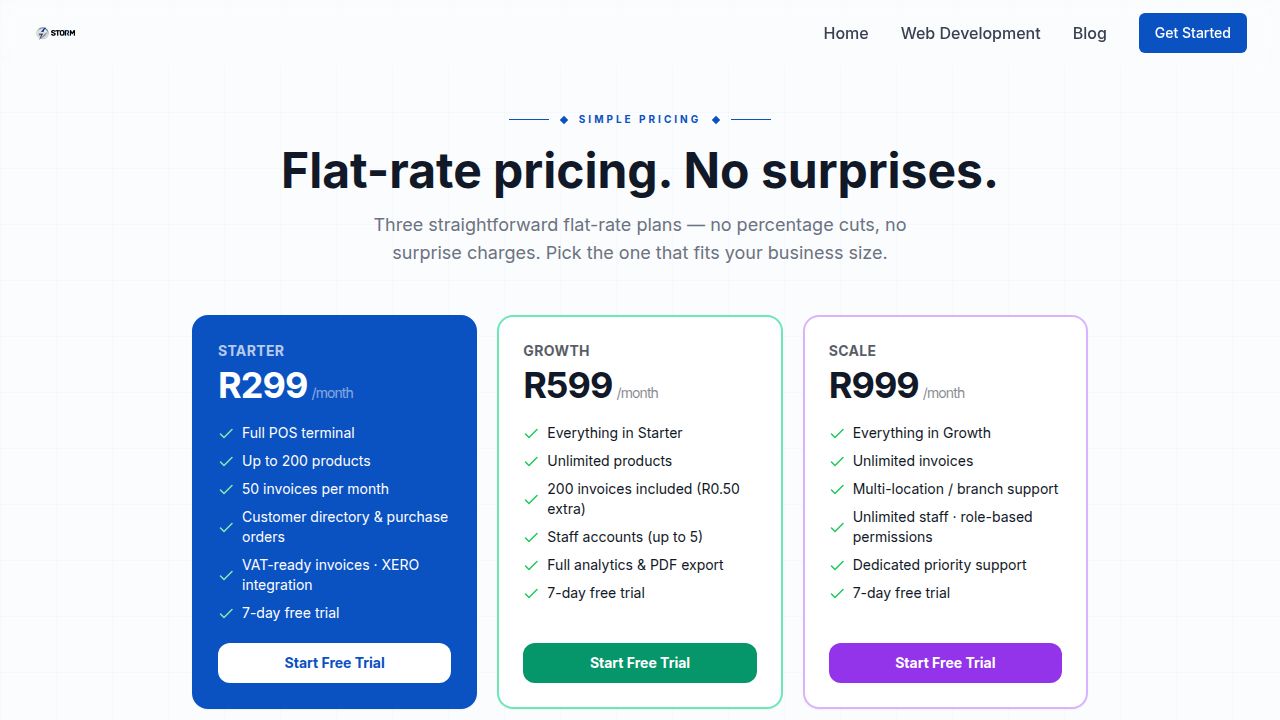
No card-swipe percentage cuts. No setup fees. No "first three months free then a R3,000 hardware deposit" trick. Three plans:
- Starter — R299/month: Full POS terminal, up to 200 products, 50 invoices/month, customer directory, purchase orders, VAT-ready invoices, XERO integration.
- Growth — R599/month: Everything in Starter, plus unlimited products, 200 invoices included (R0.50 each over), up to 5 staff accounts, full analytics, PDF export.
- Scale — R999/month: Everything in Growth, plus unlimited invoices, multi-location/branch support, unlimited staff, role-based permissions, dedicated priority support.
Every plan includes a 7-day free trial. No credit card needed to start.
13. The Things You Don't Notice (Until You Need Them)
A few features that don't get a screen but make every day easier:
- Notifications: low-stock alerts, end-of-day summaries, and important system messages all collected in the bell icon (you can see the red "1" in our screenshots — that's a real notification waiting).
- Saved payment details: regular EFT payees auto-fill on invoices.
- Receipt customisation: add a thank-you message, your social handles, or a returns policy to every printed slip.
- Light & dark themes: the whole app switches with one click — useful for a dark bar versus a bright daytime cafe.
- Tip-on-receipt toggle: per-sale, not a global setting — useful when one customer wants it and the next doesn't.
- Open Accounts: tab management for restaurants, table tracking for service venues, and account customers who pay weekly.
Who Storm POS Is Actually For
You'll get the most out of Storm POS if you're running:
- A retail shop (hardware, clothing, gifts, books, niche stores) — full inventory and barcode scanning
- A coffee shop or bakery — quick sales, categories, tips on receipts
- A pub, bar or bottle store — open accounts, age-product handling, fast cash sales
- A salon or spa — customer history, account balances, appointment-style workflows
- A small wholesaler — trade pricing, customer-specific prices, invoices and quotes
- A market trader or pop-up — works on a tablet with mobile data, syncs to the cloud, no hardware needed
If you're a single owner-operator running a side-hustle, Starter is probably enough. If you've got a couple of staff and you're sending invoices weekly, you want Growth. If you're running multiple locations, you need Scale.
How to Try It
The 7-day free trial is genuinely free — no card, no commitment. Sign up, get a fully-loaded account, ring up some test sales, send yourself a test invoice, see if it fits the way you actually work. If it does, pick a plan and keep going. If it doesn't, walk away with no card to cancel.
Try Storm POS free for 7 days
The full system, every feature, no card needed. Bilingual EN/AF, offline-capable, built for SA trading conditions. Start your free trial →
The Bottom Line
Storm POS isn't trying to be the cheapest POS in South Africa, and it isn't trying to be the most enterprise. It's trying to be the one a real shop owner can set up on a Sunday afternoon and have their staff using on Monday morning — without a training course, without a contract, without a hardware deposit, and without the lights going out being a crisis.
Every screenshot in this article is from the live system you'll get when you sign up. What you see is what you get.